
Automate.
See why Intelli-Hood® is the DCKV Leader
Put energy savings on high. Intelli-Hood® patented HVAC kitchen hood controls use optic and smart temperature sensors to monitor the level of cooking activity and automatically adjust your fans to operate at full speed only when your kitchen does.
Tell us how many hoods your organization operates and we’ll tell you how much our Intelli-Hood®DCKV technology can save you.
Intelli-Hood® at a glance
Smart: autonomous &
self-adjusting

Highest energy savings
– pays for itself in 1-3
years

NFPA 96 safety
compliance
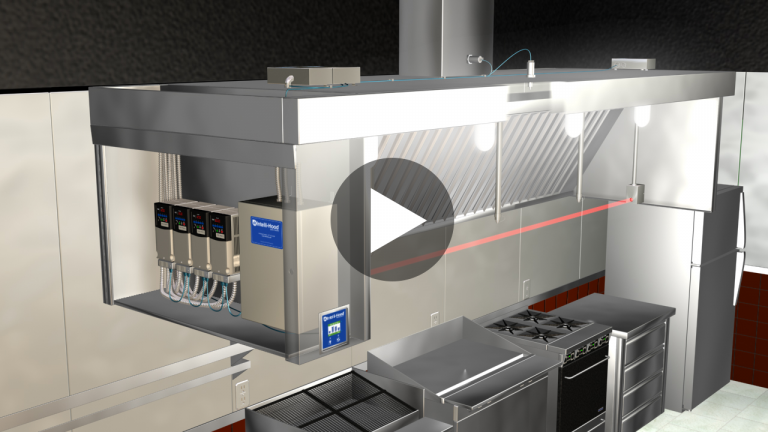
Designed to Serve You.
View the main components of the Intelli-Hood® demand control kitchen ventilation system and how our unique design maximizes kitchen energy efficiency.

Now’s not the time to put energy efficiency on the backburner.
Without the Intelli-Hood® demand control kitchen ventilation (DCKV) system, your kitchen is wasting energy, conditioned air and money. A self-learning system, Intelli-Hood® optic and temperature sensors monitor the level of cooking activity, sensing when you’re slow and continually adjusting. Why run fans at 100% speed when your kitchen isn’t? Slow down exhaust and speed up savings.
- Save up to 66%-78% on fan energy
- Save 30%-40% on conditioned air
- Pays for itself in 1-3 years
- Release fewer carbon gases into the atmosphere
- Works with new or existing commercial hood systems
Why Intelli-Hood®?
For 30 years, Retrofit Solutions has engineered smart solutions that help energy managers like you reach clean energy goals while reducing kitchen operating costs.
-
Highest Energy Efficiency
Over 25,000 GWh saved year to date.
-
Autonomous & Self-Learning
Dual sensing solution learns and automatically controls your fan speeds.
-
Hood Agnostic
Works on any manufacturer’s hood, new or existing.
-
Improves Kitchen Environment
Captures and contains effluent, smells, and other cooking by-products.
-
Enhances Fire Safety
Alerts you when the exhaust air temperature is too high.
-
Ongoing Support
Retrofit Solutions offers 24/7 staff support, a global technician network, and preventative maintenance and monitoring.


Get to Know How We Operate
Our Standard Working Process
 Initial consultation and site assessment
 Custom design and engineering

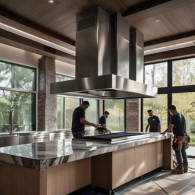 Professional installation

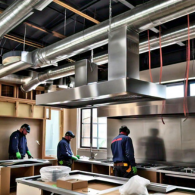 Ongoing maintenance and support
Any questions? We're here to help
How do I ensure my Intelli-Hood’s connections are correctly installed?
There are several connections that go to a Intelli-Hood®system. It is important to verify that all the cables are shielded and tight with no corrosion. Watch this how-to video about cable connections.
How do I identify my Intelli-Hood®system?
Over the years, Retrofit Solutions has designed and implemented three Intelli-Hood®systems: IH1, IH2 and IH3. While all work on the same basic principles, they DO NOT have the same parts or interfaces. Watch this video to learn how to identify your system.
What is the variable frequency drive?
This video explains Intelli-Hood’s variable frequency drive (VFD) location, connections and faults.
I need troubleshooting help. What do I do?
First, we encourage you to take a look at our resource page and how-to videos. If you need further assistance, please contact us at +91 89761 40604 or submit a request to our technical support team.
Why is my Intelli-Hood system showing an "Optics Fault" error?
The “Optics Fault” error usually occurs when the
system’s optical sensors are blocked or not
functioning correctly. To resolve this issue:
Check the Optical Sensors: Ensure they are clean and
free from dust, grease, or other debris that could
block the sensor’s view.
Verify Cable Connections: Confirm that all cables
connected to the sensors are secure, shielded, and
free from corrosion. Loose or corroded cables can cause inaccurate
readings.
Why is my Intelli-Hood system showing a "Temperature Fault" error?
A “Temperature Fault” error can arise if the temperature
sensors are malfunctioning or the connections are not properly
secured. To fix this issue:
Inspect the Temperature Sensors: Ensure that they are
working properly and are not being affected by
external factors like excessive heat or blockage.
Check Cable Connections: Make sure all cables connected
to the temperature sensors are tight, shielded, and
free from corrosion. Faulty connections can disrupt temperature
readings.
Can Intelli-Hood be connected to my existing Building Management System (BMS)?
Yes, Intelli-Hood can be integrated with your BMS system. It uses BACnet IP protocol for data transmission. This allows for centralized monitoring and control of your Intelli-Hood system alongside other building functions within the BMS.
Can I remotely monitor my Intelli-Hood system?
Absolutely! Intelli-Hood offers remote monitoring capabilities with two
options:
Ethernet Access: By providing a wired Ethernet
connection, you can access and monitor your Intelli-Hood system from a
computer on your network.
Cellular Modem: Connecting a cellular modem to the
Intelli-Hood system allows for remote monitoring from anywhere in the
world with an internet connection. This is a great option for facilities
with limited network access..
get in touch
We are Building a
Sustainable Future
Best energy solution
We Are Committed To Providing Top-Notch Kitchen Ventilation Solutions Tailored To Meet Your Specific Needs. Whether You Have Questions About Our Products, Need Support With Installation, Or Are Looking For Custom Solutions, Our Team Of Experts Is Ready To Assist You.
24/7 Technical Support
If You Need Technical Assistance Or Have Questions About Installation And Maintenance, Our Technical Support Team Is Here To Help.